The model shown in the sample. Flexible for technical service and maintenance, with evidence, signatures, validation and client-ready presentation.
Field operations and documentation
Manage field work from assignment to final report.
Create the activity, send a secure link, follow the technician in real time and turn field evidence into a clear, traceable and client-ready report.
Live field job
Service Activity
- Status
- In progress
- Evidence
- Photos + notes
- Report
- Client-ready
Professional technical report
See what a technical report generated by QuickTecc looks like.
This sample shows how job details, field evidence, materials, signatures and audit validation become one polished, client-ready report.
Professional Service Report
Client, location, schedule, assigned technician and service type.
Status updates, notes, photos, used materials and service description.
Signatures, unique ID and verification details for later review.
Open the sample report to inspect layout, signatures, validation and final presentation.
Four report models
Four report models inside the same field platform.
QuickTecc includes dedicated flows for service reports, quotes, workplace safety and telecommunications, so each operation documents the job with the right structure.
Structured for estimates, approvals, scope, pricing notes and a professional proposal record.
Designed for safety routines, risk notes, preventive controls, responsible parties and sign-off.
Built for fiber, network, installation and technical field records used by telecom teams.
Brand personalization
Personalize the workspace and reports with your company identity.
Configure your logo, public company name and brand color. The technician can open a personalized start page and the final report keeps a consistent presentation with your brand.
Logo and public company name
Show your brand where the technician and client first interact with the service.
Your brand color
Adjust the visual tone of the software so the interface feels connected to your operation.
Personalized start page
Give technicians a familiar start page in English, Portuguese, Spanish or Chinese.
Personalized report presentation
The professional PDF keeps the selected language, your brand presentation, QR validation and audit metadata.
How it works
A simple field flow from job assignment to client-ready report.
Create the activity, send the link, follow status and generate the final report while the service details are still fresh.
Create the job
Add client, location, service type, instructions and schedule.
Send the secure link
The technician opens the job without a username or password.
Follow the field activity
Viewed, on the way, arrived, in progress and completed stay visible.
Generate the professional report
The recorded service becomes a client-ready report while the details are still fresh.
Proof and traceability
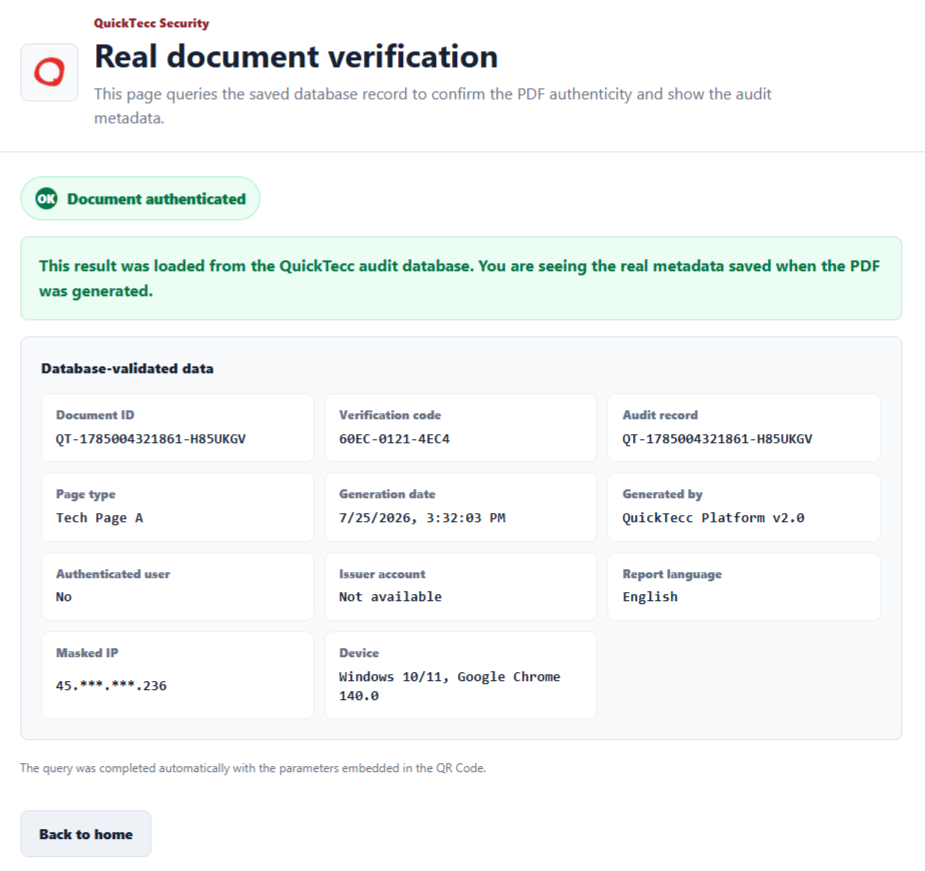
Verify the saved audit record directly from the QR Code.
At the end of the report, the QR Code opens a verification page that checks the database-backed audit record and displays document metadata.
Each professional technical report carries its own verification link in the final QR Code.
The screen queries the QuickTecc audit database before showing the result.
Document ID, verification code, audit record, generation date, language, masked IP and device stay available for review.
Document ID
Every report keeps a unique document ID connected to the service record.
Database-backed verification
The verification code and audit record help confirm that the document matches the saved database entry.
Audit metadata
Generation date, report language, issuer details, masked IP and device help review the document context.
Connected service history
The final report, evidence, signatures and conversation remain connected to the original activity.
Built-in multilingual reports
Multilingual technical reports, ready for global teams.
QuickTecc lets teams choose the report language before generation. Field evidence, signatures, QR validation and audit details stay connected while the final document is produced in English, Portuguese, Spanish or Chinese.
Document the job once. Generate the report in the language your client needs.
From a single technical record, QuickTecc AI prepares a polished professional report for local crews, international clients, suppliers or audit teams, without rebuilding the service history.
Field teams abroad
Send a secure job link to a crew in another country and deliver documentation in a language they can use.
International clients
Keep your operational standard consistent while sending a polished report in the client's preferred language.
One report standard
Evidence, signatures, QR validation and audit metadata remain connected across every language version.
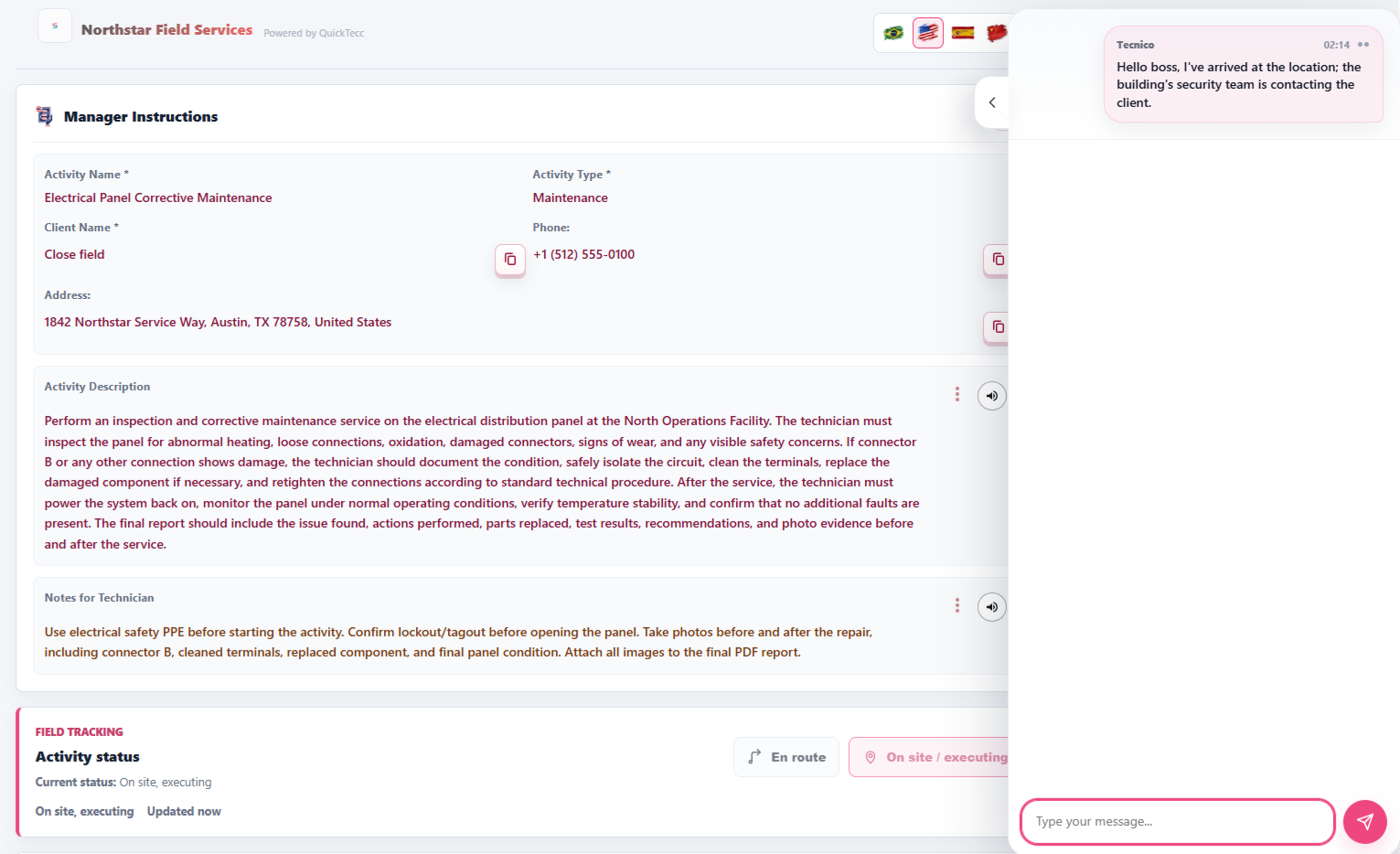
Activity chat
Live conversation while the service is active. Permanent history after it ends.
The technician can send updates from the secure activity link, while the manager follows the conversation from the dashboard. When the activity is closed, new messages stop, but the chat history remains attached to the service.
For managers
Control the operation without chasing the field team.
QuickTecc keeps status, evidence, report history and client-ready documents connected to each service.
Less admin work
Reduce typing, rework and late document preparation.
Live field status
Know what is happening without calling the technician all day.
Searchable report archive
Find, review, reprint and resend completed reports from one place.
Less paper waste
Replace printed forms with digital reports that are easier to store.
Operational savings
What does manual reporting cost your operation?
Enter your crew size, reports per day, manual time per report and labor cost. QuickTecc compares it with a professional digital report generated in about 5 minutes.
Estimated annual impact
QuickTecc estimate: 5 minutes per digital report, 22 workdays per month.
This number does not include the added value of a clear, traceable, auditable technical report with QR validation, signatures and evidence connected to the original service record.
Start saving todayWhere QuickTecc fits
For any field team that needs proof of work.
Use QuickTecc for routine service, workplace safety, installation visits, quotes, inspections and technical records.
Service and maintenance
Repairs, inspections, installation visits and recurring field work.
Construction and remodeling
Builders, drywall teams, painters, contractors and on-site progress records.
Automotive and workshops
Vehicle service records, photos, approvals, parts, notes and customer sign-off.
Workplace safety
Job safety analysis, risk notes, controls and responsible sign-off.
Telecommunications
Fiber, network, installation and technical field records for telecom teams.
Quotes and approvals
Professional estimates, approvals and client-ready documents in the same platform.
Questions before starting
Clear answers before putting QuickTecc into the field.
Grouped answers about setup, field workflow, reports, validation, data, languages, branding and the launch offer.
Create account with launch discountWhat does QuickTecc give the manager in practice?
QuickTecc lets the manager create the activity, send a secure link, follow status and chat, then receive a professional report built from the evidence collected in the field.
Who is QuickTecc for?
It is for technical service, maintenance, telecom, safety, construction, workshops and quote workflows where teams need evidence, traceability and a client-ready record.
Does the technician need an account or password?
No. The manager creates the activity and sends a secure activity link. The technician opens the link directly, which makes field adoption faster and avoids account friction for temporary or external technicians.
Can the manager follow the service in real time?
Yes. Viewed, on the way, arrived, in progress, completed and chat activity stay visible from the manager side.
What happens to the chat after the activity is closed?
New messages stop after closure, but the conversation history remains attached to the activity for review.
What can be included in the technical report?
Service details, notes, photos, materials, status history, signatures, document ID and verification details can be organized in the final report.
How does QR validation work?
The QR Code opens a verification page, checks the saved audit record and shows document metadata for review.
Is customer and service data protected?
QuickTecc is built around controlled activity access and organized service records. For data handling details, review the Privacy Policy linked below.
Does QuickTecc replace paper, spreadsheets and scattered messages?
That is the goal. Instead of spreading service information across paper forms, chats, photos and spreadsheets, QuickTecc keeps the activity, evidence, conversation and final report connected in one workflow.
Does QuickTecc work in different languages?
Yes. Reports can be generated in English, Portuguese, Spanish or Chinese while evidence, signatures and metadata stay tied to the same service.
What can be personalized?
Your logo, public company name, brand color, personalized start page and report presentation can be configured.
How does the savings calculator work?
It estimates recovered work time and printing costs based on your inputs. It is an operational estimate, not a guaranteed financial result.
How does the 50% launch coupon work?
Use code QUICKTECC2026 when creating your account to start your first month with 50% off.
What if my company has a specific workflow?
For partnerships, investment conversations or customized implementations, contact comercial@quicktecc.com.
Why was QuickTecc built?
QuickTecc came from field reality: technicians need something fast enough for the job site, and managers need status, evidence and final documents organized for the office. The belief is simple: high-standard service deserves a clear, professional and traceable record.

Launch offer
Start your first month with 50% off.
Use code QUICKTECC2026 when creating your account.
The launch discount applies to the first month when creating your account.